

Description
Simple File Upload Limiter lets you set a different maximum upload size for each kind of file, right from the WordPress admin. Users can’t upload files that exceed the limits you define, which helps you keep your server resources and media library under control.
Features:
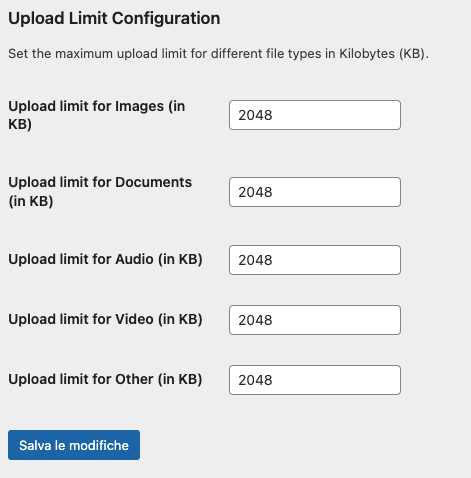
- Separate limits for images, documents, audio, video and other file types.
- Limits defined in kilobytes (KB).
- One simple settings page under Settings > File Upload Limiter.
- A clear error message tells the user which limit was exceeded.
Looking to limit uploads by user role instead of by file type? Take a look at Simple Upload Weight Limit.
Screenshots
Installation
- Upload the
simple-file-upload-limiterfolder to the/wp-content/plugins/directory. - Activate the plugin through the ‘Plugins’ menu in WordPress.
- Go to Settings > File Upload Limiter to configure the upload limits.
FAQ
-
Can I set different limits for different file types?
-
Yes. You can set individual upload limits for images, documents, audio, video, and other file types from the plugin’s settings page.
-
What happens if a user tries to upload a file that exceeds the limit?
-
The upload is refused and the user sees an error message that includes the file type and the allowed limit.
-
Does this raise my server’s upload limit?
-
No. The limits set here can only be lower than or equal to the maximum your hosting allows (
upload_max_filesizeandpost_max_sizein PHP). They can’t raise it.
Reviews
There are no reviews for this plugin.
Contributors & Developers
“Simple File Upload Limiter” is open source software. The following people have contributed to this plugin.
Contributors
Translate “Simple File Upload Limiter” into your language.
Interested in development?
Browse the code, check out the SVN repository, or subscribe to the development log by RSS.
Changelog
1.1.0
- Saved limits are now sanitized: one positive whole number per file type.
- Removed the manual translation loading, which WordPress handles automatically for plugins hosted on WordPress.org.
- Added the missing license URI and minimum-version headers.
- Added a gentle, dismissible review request on the settings page (shown after a week).
- Tested with WordPress 7.1.
1.0.0
- Initial release.